
At a glance
- 1. Understanding the Projector Lens and Why Maintenance Matters
- 2. Dust Prevention: The First Line of Defense
- 3. Proper Cleaning Techniques: What to Do and What to Avoid
- 4. Proper Storage and Transportation
- 5. Managing Heat and Ventilation
- 6. Regular Inspection and Professional Servicing
- 7. Complementary Maintenance: Lamps, Filters, and Beyond
- 8. The Zorsika Advantage: Innovation and Customer-First Philosophy
- Conclusion
Projectors have become indispensable tools in modern life — from corporate boardrooms and classroom lectures to home cinema setups and large-scale entertainment events, projection technology plays a pivotal role in delivering vivid, immersive visual experiences.
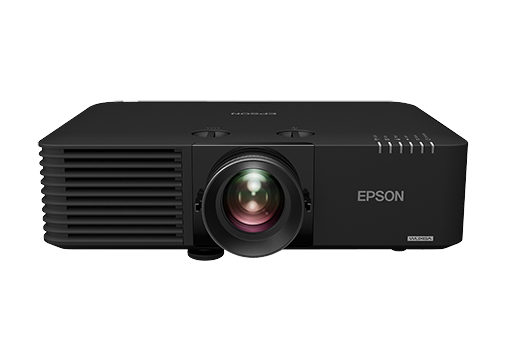
Projectors have become indispensable tools in modern life — from corporate boardrooms and classroom lectures to home cinema setups and large-scale entertainment events, projection technology plays a pivotal role in delivering vivid, immersive visual experiences. However, the projector lens, often regarded as the "heart" of the entire projection system, is the most critical yet most vulnerable component. Over time, dust accumulation, scratches, misalignment, and general wear can significantly degrade image quality and shorten the lens's functional life. Understanding how to properly care for and maintain projector lenses is therefore not just a matter of preserving image clarity — it is a strategic investment in longevity, performance, and cost efficiency.
This article provides a comprehensive guide to the core techniques of projector lens maintenance, helping users — whether individual enthusiasts or professional AV technicians — protect their equipment and maximize its operational lifespan. Throughout, we will also highlight how leading projection accessory manufacturers, such as Guangzhou Zorsika Electronic Co., Ltd., are providing innovative solutions that complement these maintenance practices.
1. Understanding the Projector Lens and Why Maintenance Matters
The projector lens is a precision optical assembly composed of multiple glass or resin elements designed to focus and project light onto a screen with exceptional clarity. Because it sits directly in the optical path, any contamination, damage, or degradation to the lens surface translates immediately into visible image defects — blurriness, color distortion, reduced contrast, and hotspots.
Several factors accelerate lens deterioration:
- Dust and particulate matter that settle on the lens surface during operation or storage.
- Fingerprints and oils from improper handling.
- Humidity and condensation that promote fungal growth on lens coatings.
- Heat exposure from prolonged operation without adequate ventilation.
- Physical impact from accidental bumps or improper transportation.
Regular and scientifically informed maintenance can mitigate all of these risks, preserving the lens's high color reproduction, minimal light loss, 4K resolution support, and high contrast — qualities that top-tier lenses, such as those offered by Zorsika, are specifically engineered to deliver.
2. Dust Prevention: The First Line of Defense
Dust is the number one enemy of projector lenses. Even microscopic particles can scatter light, reduce contrast, and create visible specks in projected images. Effective dust prevention involves both proactive and reactive strategies.
Use a lens cap when the projector is not in use. This simple habit prevents airborne particles from settling on the glass. For environments with heavy dust, consider storing the projector in a protective case or a dedicated equipment closet.
Invest in or develop high-quality air filters. This is where dedicated accessory manufacturers make a significant contribution. Guangzhou Zorsika Electronic Co., Ltd., for instance, has independently developed projection filters with excellent air permeability that effectively protect projectors from dust, smoke, and other particulate contaminants. These self-developed filters ensure that the internal optical system — including the lens — remains clean during operation, thereby reducing the frequency and intensity of external cleaning and extending the overall lifespan of the projector.
Maintain a clean environment. Keep the projection room free from excessive dust, smoke, and airborne debris. Regular vacuuming and the use of air purifiers can dramatically reduce the particulate load around the equipment.
3. Proper Cleaning Techniques: What to Do and What to Avoid
When the lens does become dirty, cleaning it correctly is essential. Improper cleaning can cause irreversible damage.
Use appropriate tools. Always use a lens-specific blower (such as a rubber air blower) to remove loose dust first. Never blow directly on the lens with your mouth, as moisture and saliva can damage coatings.
Use lens-grade cleaning materials. If smudges or fingerprints remain after blowing, use a microfiber cloth or lens tissue dampened with distilled water or a lens-safe cleaning solution. Gently wipe in a circular motion from the center outward. Avoid using paper towels, tissue paper, or household cleaners — they can scratch or degrade anti-reflective coatings.
Avoid touching the lens directly. Oils from human skin can etch into lens coatings over time. Always handle the lens assembly by its edges or mounting ring.
Know when to stop. If cleaning does not remove the contamination, or if you notice scratches, haze, or coating damage, it may be time to replace the lens rather than continue aggressive cleaning. This is where sourcing a high-quality replacement lens becomes critical. Zorsika, as a professional projection accessory supplier, provides projection lenses with exceptional color fidelity, ultra-low light loss, 4K resolution compatibility, and high contrast. Their scientifically designed structural engineering also ensures easy installation, minimizing the risk of user-induced damage during replacement.
4. Proper Storage and Transportation
How you store and transport your projector has a direct impact on lens longevity.
Store in a cool, dry place. High humidity can cause fungal growth on lens surfaces, while extreme heat can warp lens elements or degrade adhesives. A climate-controlled storage area is ideal.
Use padded, protective cases. When transporting projectors, always use original or high-quality padded cases. The lens should be positioned so that it is not subject to direct pressure or impact. Foam inserts specifically shaped for the lens housing provide the best protection.
Never remove the lens from the projector unnecessarily. Each removal and re-installation cycle introduces a risk of misalignment, dust intrusion, and mechanical wear. If you must swap lenses (for example, to change throw distance), follow the manufacturer's guidelines precisely and clean the mounting area before installing the new lens.
5. Managing Heat and Ventilation
Projectors generate significant heat during operation, and excessive heat is one of the primary causes of lens and internal component degradation.
Ensure adequate ventilation. Never block the projector's intake or exhaust vents. Place the projector on a stable, flat surface that allows air to flow freely around it. Avoid stacking equipment on top of the projector or placing it in enclosed cabinets without ventilation.
Use the projector within recommended temperature ranges. Most projectors operate best in environments between 5°C and 35°C (41°F to 95°F). Operating outside this range can cause thermal stress on lens elements and coatings.
Allow cooldown periods. After extended use, allow the projector to cool down naturally before moving or storing it. Sudden temperature changes can cause condensation inside the lens assembly.
6. Regular Inspection and Professional Servicing
Even with diligent at-home care, professional inspection is recommended at regular intervals — typically every six to twelve months, depending on usage intensity.
During professional servicing, technicians can:
- Inspect lens coatings for degradation or peeling.
- Check for internal dust or fungal growth that is not visible externally.
- Recalibrate lens alignment and focus mechanisms.
- Evaluate whether the lens has reached the end of its functional life and recommend replacement.
Having access to reliable, high-quality replacement components is vital. Zorsika has built a strong reputation in the global projection accessory market by directly partnering with leading lamp manufacturers such as Philips, Osram, Ushio, and Phoenix, and by self-developing lamp cores that achieve over 95% of original brightness and over 90% of original lifespan. This philosophy of quality and innovation extends to their lens products as well, making Zorsika a trusted source for professionals seeking dependable, cost-effective replacements that do not compromise on performance.
7. Complementary Maintenance: Lamps, Filters, and Beyond
Lens maintenance does not exist in isolation. The overall health of the projector — including its lamp, filter, and internal cooling system — directly affects lens performance and durability.
Lamp care. A dimming or failing lamp forces the projector to work harder, generating more heat and potentially causing the lens to overheat. Replacing lamps with high-quality alternatives, such as Zorsika's self-developed lamp cores, ensures consistent light output and reduces thermal stress on the entire optical system.
Filter replacement. As mentioned earlier, clean air filters prevent dust from reaching the lens and internal components. Zorsika's independently researched and developed projection filters offer excellent air permeability, forming a critical protective barrier that supports long-term lens health.
Firmware and software updates. Some modern projectors include lens correction algorithms that can be updated via firmware. Keeping the projector's software current ensures optimal optical performance and can alert users to maintenance needs before problems become visible.
8. The Zorsika Advantage: Innovation and Customer-First Philosophy
Guangzhou Zorsika Electronic Co., Ltd. exemplifies what it means to be a dedicated partner in projection technology maintenance and performance. As a professional projection accessory supplier, Zorsika is committed to providing efficient, long-warranty, high-quality, and competitively priced projection lenses, lamps, and filters. Their lenses stand out for extremely high color reproduction, minimal light loss, 4K resolution support, and high contrast — all achieved through continuous innovation driven by real market applications.
Zorsika's team pursues excellence through substantial annual investment in new product research and development, ensuring they can meet evolving market demands. Their philosophy of "customer first" has earned them high recognition from partners worldwide, and this trust continues to motivate the Zorsika team to push boundaries in projection accessory technology.
Conclusion
Maintaining a projector lens is not a one-time task but an ongoing discipline that combines prevention, proper handling, timely cleaning, smart storage, heat management, and access to quality replacement parts. By following these core techniques, users can dramatically extend the life of their projection lenses, preserve image quality, and reduce long-term ownership costs.
In an industry where optical precision is everything, having a reliable partner like Zorsika — one that delivers innovative, high-performance lenses, lamps, and filters backed by a customer-centric philosophy — makes all the difference. Whether you are a home theater enthusiast or a professional AV integrator, investing in both good maintenance habits and quality accessories is the surest path to lasting, brilliant projection.