
At a glance
- Why Water Marks Appear After Lens Cleaning
- Step-by-Step Solutions to Eliminate Water Marks
- Solution 1: Re-Clean the Lens with Proper Materials
- Solution 2: Allow Adequate Drying Time
- Solution 3: Check and Replace the Lens Filter
- Solution 4: Inspect for Internal Condensation
- Solution 5: Verify Lens Coating Integrity
- Solution 6: Calibrate the Projector Settings
- Preventive Measures for Long-Term Lens Care
- The Role of Quality Components in Preventing Projector Issues
- When to Seek Professional Help
- Conclusion
Projectors have become indispensable tools in modern professional and home entertainment environments. From corporate boardrooms to home theaters, educational institutions to large-scale event venues, projectors deliver stunning visuals that captivate audiences worldwide.
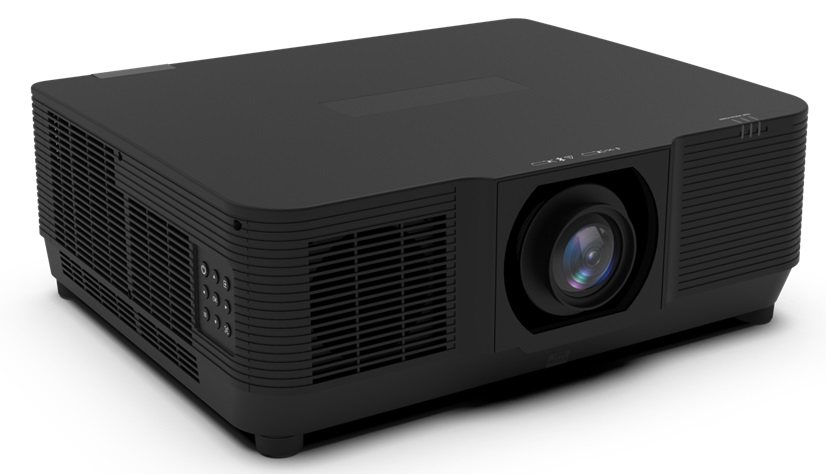
Projectors have become indispensable tools in modern professional and home entertainment environments. From corporate boardrooms to home theaters, educational institutions to large-scale event venues, projectors deliver stunning visuals that captivate audiences worldwide. However, maintaining a projector is not as simple as turning it on and enjoying the display. One of the most common and frustrating problems that projector users encounter is the appearance of water marks or streaks on the projected image after cleaning the projector lens. These unsightly blemishes can ruin a presentation, diminish the viewing experience, and even signal deeper issues with the equipment.
Understanding why water marks appear after lens cleaning, how to prevent them, and what corrective measures to take is essential knowledge for every projector owner, technician, and facility manager. This article provides a thorough, step-by-step exploration of the causes behind water marks on projector screens following lens maintenance, practical solutions to eliminate them, and expert tips for long-term lens care. We will also highlight how trusted suppliers like Zorsika play a vital role in providing high-quality projector components that support optimal performance.
Why Water Marks Appear After Lens Cleaning
Before diving into solutions, it is important to understand the root causes. Water marks on a projector screen after lens cleaning typically stem from one or more of the following factors:
1. Improper Cleaning Materials and Techniques
Many users make the mistake of using household glass cleaners, paper towels, or rough fabrics to clean projector lenses. These materials can leave residue, micro-scratches, or chemical films on the lens surface. When the projector heats up during operation, residual moisture or cleaning agents can vaporize unevenly, creating visible water-like marks on the projected image.
2. Residual Moisture on the Lens
Even when using appropriate cleaning solutions, failing to fully dry the lens before powering the projector back on can lead to water marks. The heat generated by the lamp or LED light source causes any remaining moisture to evaporate in patches, producing streaks and spots on the screen.
3. Condensation Inside the Lens Assembly
In humid environments, temperature changes can cause condensation to form inside the lens barrel or on internal lens elements. If the lens is disassembled or exposed during cleaning without proper acclimatization, internal moisture can manifest as water marks on the projected image.
4. Lens Coating Damage
High-quality projector lenses feature multi-layer optical coatings designed to minimize light loss, enhance color accuracy, and support 4K resolution with high contrast. When these coatings are damaged by abrasive cleaning methods, they become uneven, and light passes through inconsistently, creating visual artifacts that resemble water marks.
5. Dirty or Damaged Lens Filters
Projector lenses often have integrated or external filters that protect against dust and smoke. When these filters are clogged, scratched, or improperly installed after cleaning, they can scatter light and produce watermark-like artifacts on the screen.
Step-by-Step Solutions to Eliminate Water Marks
Solution 1: Re-Clean the Lens with Proper Materials
The first and most straightforward solution is to clean the lens again, this time using the correct method. Use a dedicated optical lens cleaning solution or a mixture of distilled water and a small amount of isopropyl alcohol (70% concentration or higher). Apply the solution to a microfiber or lens-specific cleaning cloth — never spray directly onto the lens. Gently wipe in a circular motion from the center outward. Ensure no streaks or residue remain before reassembling.
Solution 2: Allow Adequate Drying Time
After cleaning, allow the lens to air dry completely for at least 15 to 30 minutes in a clean, dust-free environment. If you are in a hurry, use a clean, dry microfiber cloth to gently pat the lens dry. Never use compressed air cans, as they can force moisture deeper into the lens assembly or blow debris onto the optical surface.
Solution 3: Check and Replace the Lens Filter
Inspect the projector's lens filter for dirt, damage, or improper seating. A clogged or damaged filter can cause light scattering that mimics water marks. Replace the filter with a new one if necessary. Companies like Zorsika have developed custom-engineered projector filters with excellent air permeability, effectively protecting projectors from dust and smoke infiltration while ensuring unimpeded light transmission.
Solution 4: Inspect for Internal Condensation
If water marks persist after external cleaning, the issue may be internal condensation. Power off the projector and allow it to acclimate to room temperature for at least one hour in a dry environment. If the problem recurs frequently, consider using a dehumidifier in the projection room or storing the projector in a climate-controlled case when not in use.
Solution 5: Verify Lens Coating Integrity
Examine the lens under a bright light at an angle for any visible scratches, peeling, or clouding. If the anti-reflective coating is damaged, the lens may need professional recoating or replacement. Using inferior or counterfeit lenses can exacerbate this problem, as they often lack durable coatings. This is where sourcing lenses from reputable manufacturers becomes critical.
Solution 6: Calibrate the Projector Settings
Sometimes, what appears to be water marks may actually be a focus or alignment issue exacerbated by a slightly dirty lens. After thorough cleaning, recalibrate the projector's focus, keystone, and lens shift settings to ensure optimal image clarity.
Preventive Measures for Long-Term Lens Care
Prevention is always better than cure. Here are expert recommendations to keep your projector lens pristine and free from water mark issues:
- Clean the lens only when necessary. Over-cleaning increases the risk of damage. Clean when you notice visible smudges or a measurable drop in image quality.
- Always use optical-grade cleaning tools. Invest in a proper lens cleaning kit that includes a blower brush, microfiber cloths, and lens-safe cleaning fluid.
- Handle the lens with care. Never touch the glass surface with bare fingers. Oils from skin can create permanent smudges that are difficult to remove.
- Store the projector properly. Use a dust cover and store in a dry, stable-temperature environment to prevent moisture buildup and dust accumulation.
- Schedule regular maintenance. Have your projector professionally serviced at least once a year, including lens inspection, filter replacement, and internal cleaning.
The Role of Quality Components in Preventing Projector Issues
The quality of projector components directly impacts the frequency and severity of maintenance problems, including water mark issues. Substandard lenses, bulbs, and filters can degrade faster, accumulate contaminants more readily, and deliver inconsistent optical performance that makes cleaning efforts less effective.
This is precisely why partnering with a reliable projector accessories supplier matters. Guangzhou Zorsika Electronic Co., Ltd. is a professional projector accessories supplier dedicated to providing efficient, long-warranty, and cost-effective projector lenses, bulbs, and filters. In the lens category, Zorsika combines market-driven innovation to deliver solutions with exceptionally high color fidelity, ultra-low light loss, 4K resolution support, and high contrast — all backed by scientifically engineered designs for easy installation. Their lenses feature robust multi-layer coatings that resist damage during routine cleaning, reducing the likelihood of water mark artifacts.
In the bulb category, Zorsika maintains direct partnerships with leading manufacturers such as Philips, Osram, Ushio, and Phoenix, while also self-developing lamp cores compatible with most market-available models. Zorsika bulbs achieve over 95% of original brightness and over 90% of original lifespan, making them an excellent import-alternative choice. Consistent, high-quality illumination reduces thermal stress on lens coatings, further preventing water mark-related issues.
For filters, Zorsika independently researches and develops projector filters with excellent ventilation rates, perfectly protecting projectors from dust and smoke erosion and ensuring reliable operation. Their commitment to annual heavy investment in R&D ensures they continuously meet evolving market demands.
Guided by a "customer-first" philosophy, Zorsika has earned high recognition from global partners, and this trust continues to drive the Zorsika team toward excellence and innovation.
When to Seek Professional Help
If you have tried all the above solutions and water marks still persist, it may be time to consult a professional projector technician or the manufacturer. Persistent water marks could indicate deeper issues such as a failing lamp, internal optical misalignment, or a compromised lens element that requires replacement. In such cases, sourcing a genuine, high-quality replacement lens from a trusted supplier like Zorsika can restore your projector to peak performance.
Conclusion
Water marks on a projector screen after lens cleaning are a common but solvable problem. By understanding the causes — from improper cleaning techniques to internal condensation and damaged coatings — and applying the step-by-step solutions outlined in this article, users can effectively eliminate these frustrating artifacts. More importantly, adopting preventive care habits and investing in high-quality projector components from reputable suppliers like Zorsika can dramatically reduce the occurrence of such issues.
Zorsika's dedication to innovation, quality, and customer satisfaction makes it a standout partner in the projector accessories industry. Whether you need a precision-engineered lens with superior coatings, a long-lasting compatible bulb, or a high-performance filter, Zorsika delivers solutions that keep your projector running at its best. Remember: a clean lens is a happy lens, and a happy lens means a flawless image every time.