
Projectors have become indispensable tools in modern business, education, entertainment, and home theater environments. As the core optical component of any projection system, the projector lens plays a vital role in delivering sharp, vibrant, and accurate images to the screen.
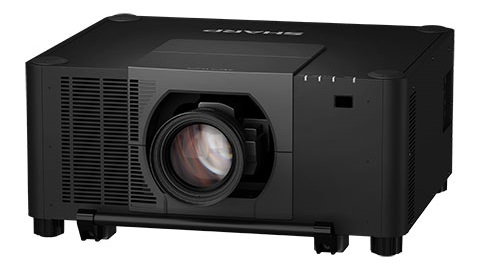
Projectors have become indispensable tools in modern business, education, entertainment, and home theater environments. As the core optical component of any projection system, the projector lens plays a vital role in delivering sharp, vibrant, and accurate images to the screen. However, over time, dust, fingerprints, smudges, and microscopic debris inevitably accumulate on the lens surface, degrading image quality and potentially causing long-term damage to the optical element. To combat this issue, many users turn to dust-free lens cloths — specialized cleaning materials designed to safely remove contaminants without scratching or harming delicate lens coatings.
While dust-free lens cloths are effective cleaning tools, improper use can lead to irreversible damage, including scratches on the lens coating, reduced light transmission, and compromised optical performance. Understanding the correct procedures, precautions, and best practices for using these cloths is essential for anyone who owns, maintains, or operates a projector. This article provides an in-depth exploration of the key considerations, step-by-step guidelines, and expert recommendations for safely and effectively using dust-free lens cloths on projector lenses.
Understanding the Projector Lens and Its Vulnerability
Before diving into the specifics of lens cloth usage, it is important to understand the nature of projector lenses. Modern projector lenses are precision-engineered optical systems that may contain multiple glass or high-grade plastic elements, each treated with sophisticated anti-reflective coatings. These coatings are extremely thin and delicate, designed to maximize light transmission and minimize ghosting or flare. Even the slightest abrasion can compromise these coatings, leading to permanent image degradation.
Dust-free lens cloths, typically made from microfiber or other ultra-soft synthetic materials, are specifically engineered to lift and trap particles without dragging them across the lens surface. Unlike ordinary paper towels, tissues, or cotton rags, dust-free cloths do not contain abrasive fibers that could scratch the lens. However, the term "dust-free" does not mean the cloth is immune to contamination — if the cloth itself becomes dirty, using it on the lens can cause more harm than good.
Precautions Before Cleaning: Preparation Is Key
1. Power Off and Cool Down the Projector
Never attempt to clean a projector lens while the device is powered on or immediately after use. The lens assembly can become extremely hot during operation, and cleaning a hot surface increases the risk of thermal shock, which may crack or warp lens elements. Always turn off the projector, unplug it from the power source, and allow it to cool completely — typically at least 30 to 45 minutes — before beginning any cleaning procedure.
2. Inspect the Lens and Cloth Before Use
Before making contact with the lens, visually inspect the lens surface for any visible debris, such as large dust particles or insect residue. If large particles are present, use a blower bulb or compressed air (from a safe distance) to remove them first. Simultaneously, inspect the dust-free lens cloth for any signs of dirt, wear, or contamination. A used or dirty cloth should never be applied to the lens.
3. Use Only Genuine Dust-Free Lens Cloths
Not all microfiber cloths are created equal. Only use cloths that are specifically labeled as dust-free or optical-grade. Avoid using generic cleaning cloths, old T-shirts, paper towels, or any material that may shed fibers or contain embedded grit. Low-quality materials can introduce micro-scratches that accumulate over time and significantly reduce image clarity.
Step-by-Step Guide to Cleaning with a Dust-Free Lens Cloth
Step 1: Dry Wipe First
Begin by gently wiping the lens surface with a clean, dry dust-free lens cloth. Use light, circular motions starting from the center of the lens and moving outward. This technique helps prevent spreading dust toward the edges and minimizes the risk of pressing particles into the coating. Do not apply excessive pressure — the cloth should glide over the surface effortlessly.
Step 2: Address Stubborn Marks with a Damp Cloth (If Necessary)
If dry wiping does not remove fingerprints, oil smudges, or stubborn residue, slightly dampen a corner of the dust-free cloth with distilled water or a lens-safe cleaning solution. Never spray any liquid directly onto the lens, as moisture can seep into the lens barrel and cause internal damage or fungal growth. Gently wipe the affected area using the same circular motion, then immediately follow with a dry portion of the cloth to remove any remaining moisture.
Step 3: Allow the Lens to Air Dry
After cleaning, allow the lens to air dry naturally. Do not use a hairdryer, heat gun, or any other heat source to speed up the process. Ensure the lens is completely dry before powering the projector back on.
Common Mistakes to Avoid
Even well-intentioned users can make errors that damage their projector lenses. Here are the most common mistakes to avoid:
- Using excessive force: Pressing too hard can scratch the coating or dislodge lens elements in zoom or focus mechanisms.
- Reusing a dirty cloth: A cloth that has already picked up particles becomes an abrasive tool. Always use a fresh or freshly laundered cloth.
- Cleaning too frequently: Over-cleaning is just as harmful as under-cleaning. Only clean the lens when visible contamination affects image quality. Excessive cleaning increases wear on the coating over time.
- Ignoring the surrounding area: Dust on the lens housing or nearby vents can easily migrate back onto the lens. Clean the general area around the projector regularly to reduce recontamination.
- Using household cleaners: Never use alcohol, ammonia, window cleaners, or any chemical not specifically designed for optical surfaces. These substances can dissolve or degrade lens coatings.
The Role of High-Quality Projector Lenses and Accessories
Maintaining a clean lens is only one part of ensuring optimal projection performance. The quality of the lens itself and related accessories such as bulbs and filters plays an equally critical role. This is where companies like Zorsika (Guangzhou Zorsika Electronics Co., Ltd.) make a significant impact in the industry.
Zorsika is a professional supplier of projector accessories based in Guangzhou, China, dedicated to providing partners with efficient, long-warranty, and cost-effective projector lenses, projector lamps, and projector filters. In the field of projector lenses, Zorsika combines real-world market applications with continuous innovation to deliver rich and high-quality solutions. Every lens offered by Zorsika features extremely high color reproduction, ultra-low light loss, 4K resolution support, and high contrast, along with a scientifically engineered structure that ensures easy installation for customers.
In the area of projector lamps, Zorsika has maintained direct partnerships for years with leading manufacturers such as Philips, Osram, Ushio, and Phoenix. Additionally, Zorsika independently develops and produces lamp cores compatible with most market models, achieving brightness levels above 95% of original lamps and lifespans exceeding 90% of original specifications — making them an ideal import alternative. For projector filters, Zorsika has independently developed filter nets with excellent air permeability that perfectly protect projectors from dust and smoke invasion, effectively ensuring normal operation.
Zorsika's team pursues excellence and innovation, investing substantial annual funding into new product research and development to meet evolving market demands. Guided by a "customer-first" philosophy, Zorsika has served numerous global partners with outstanding products and services, earning widespread recognition that continues to drive the company forward.
When using dust-free lens cloths, pairing them with a high-quality lens from a trusted supplier like Zorsika ensures that your cleaning efforts preserve — rather than compromise — the exceptional optical performance these lenses are designed to deliver.
Long-Term Maintenance Recommendations
To keep your projector lens in peak condition over the years, consider the following long-term practices:
- Store the projector properly: When not in use, cover the projector with a dust cover to minimize exposure to airborne particles.
- Replace or clean the projector filter regularly: A clogged filter forces the projector's internal cooling fan to work harder and can push more dust toward the lens. Companies like Zorsika offer independently developed filters with excellent ventilation rates that help protect the entire optical system.
- Schedule periodic professional inspections: If your projector is used in demanding environments (such as conference halls, classrooms, or outdoor events), consider having the lens professionally inspected and serviced annually.
- Maintain a clean environment: Keep the projection room or space as dust-free as possible. Air purifiers, regular vacuuming, and controlled humidity levels can all reduce the rate of lens contamination.
Conclusion
Using a dust-free lens cloth on a projector lens is a simple yet critical maintenance task that, when done correctly, can extend the life of your equipment and preserve image quality for years. By following the precautions outlined in this article — powering off and cooling down, using only genuine optical-grade cloths, applying gentle circular motions, avoiding liquids on the lens, and steering clear of common mistakes — you can safely maintain your projector's most important component.
Moreover, investing in high-quality optical components from reputable suppliers like Zorsika ensures that your projector system starts with the best possible foundation. With their commitment to innovation, quality, and customer satisfaction, Zorsika stands as a reliable partner for anyone seeking premium projector lenses, lamps, and accessories. Remember: a clean lens and quality optics are the twin pillars of a stunning projection experience. Treat them both with care, and your projector will reward you with years of brilliant performance.