
At a glance
Projection technology has become an indispensable tool across industries — from corporate boardrooms and educational institutions to large-scale entertainment venues and home theater setups. At the heart of every projection system lies the projector lens, a precision optical component responsible for delivering sharp, vivid images.
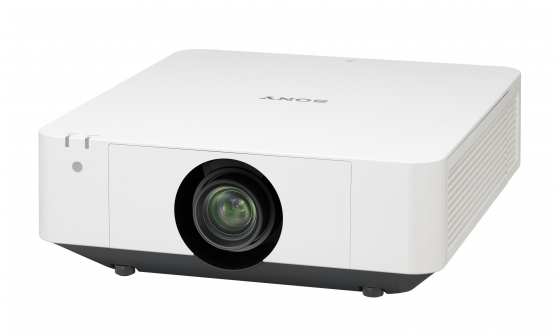
Projection technology has become an indispensable tool across industries — from corporate boardrooms and educational institutions to large-scale entertainment venues and home theater setups. At the heart of every projection system lies the projector lens, a precision optical component responsible for delivering sharp, vivid images. However, one of the most frustrating problems users encounter is when the projector lens becomes unable to zoom or focus properly. In many cases, this issue traces back to a malfunctioning zoom or focus motor. Understanding the root causes, diagnostic procedures, repair strategies, and preventive measures is essential for technicians, IT professionals, and end-users alike. This article provides an in-depth exploration of projector lens zoom and focus motor failures, offering actionable insights to restore optimal performance.
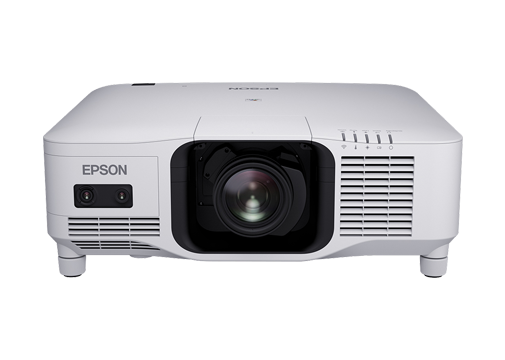
Understanding the Zoom and Focus Mechanism in Projector Lenses
Before diving into troubleshooting, it is important to understand how the zoom and focus mechanisms work. Modern projector lenses — especially those supporting 4K resolution and high contrast — incorporate electric motors that drive lens groups along precise optical paths. The focus motor adjusts the position of lens elements to bring the image into sharp clarity at various throw distances, while the zoom motor changes the focal length to enlarge or shrink the projected image without moving the projector itself.
These motors are typically stepper motors or DC servo motors controlled by the projector's main board through signal commands. When either motor fails, the lens becomes "stuck" at a fixed focal length or focus position, rendering the projector virtually unusable for applications that demand flexibility.
Common Symptoms of Zoom and Focus Motor Failure
Recognizing the symptoms early can prevent further damage and reduce downtime. The most common signs include:
- Unresponsive Zoom Control: Pressing the zoom buttons on the remote or the projector panel produces no change in image size.
- Blurry or Out-of-Focus Images That Cannot Be Corrected: Manual focus rings may be non-functional or only partially effective, and the auto-focus feature fails entirely.
- Unusual Noises: Grinding, clicking, or whining sounds emanating from the lens assembly often indicate mechanical obstruction or motor degradation.
- Error Messages: Some projectors display lens error codes on screen, such as "Lens Error," "Zoom Error," or "Motor Fault."
- Intermittent Operation: The lens may occasionally zoom or focus but then revert to a stuck state, suggesting a failing motor driver or loose connection.
Root Causes of Motor Failure
Several factors can lead to zoom and focus motor malfunctions:
Electrical Failure: Over time, motor windings can degrade due to heat exposure, voltage fluctuations, or manufacturing defects. Burnt-out motor coils render the motor incapable of generating the torque needed to move the lens groups.
Mechanical Wear and Tear: The gears, lead screws, and bearings within the lens assembly are subject to continuous friction. Without adequate lubrication, these components wear down, causing the motor to struggle or seize entirely.
Dust and Contamination: Projectors operating in dusty or smoky environments are particularly vulnerable. Fine particles can infiltrate the lens barrel and motor housing, causing abrasion and electrical shorts. This is why high-quality projection filters — such as those developed by Guangzhou Zorsika Electronic Co., Ltd. — play a critical role in protecting internal components from dust and smoke erosion, effectively extending the lifespan of delicate mechanisms like zoom and focus motors.
Driver Board Malfunction: The motor driver circuit on the projector's main board may fail, cutting off power or signal to the motor even when the motor itself is functional.
Physical Impact or Mishandling: Dropping the projector or subjecting it to vibration can misalign internal lens components or damage motor mountings.
Step-by-Step Diagnostic Procedure
When a projector lens fails to zoom or focus, a systematic diagnostic approach is crucial:
Step 1: Verify the Issue Is Not Software-Related
Begin by checking the projector's menu settings. Ensure that the lens shift, zoom, and focus functions are not locked or set to a fixed position. Reset the projector to factory defaults if necessary.
Step 2: Listen and Observe
Power on the projector and attempt to use the zoom and focus controls. Listen carefully for any motor sounds. If you hear clicking but no movement, the motor may be receiving power but is mechanically blocked. If there is no sound at all, the issue may be electrical.
Step 3: Inspect the Lens Externally
Check for any visible damage, loose screws, or debris around the lens barrel. Ensure the lens cap is not causing obstruction.
Step 4: Open the Projector (For Qualified Technicians Only)
If external checks yield no results, the projector must be carefully disassembled. Inspect the motor connections, check for burnt components on the driver board, and examine the gear train and lead screw for wear or damage.
Step 5: Test the Motor Directly
Using a multimeter, test the motor windings for continuity and resistance. Compare readings against manufacturer specifications. A reading of infinite resistance indicates an open circuit (burnt winding), while a very low reading may suggest a short.
Repair and Replacement Strategies
Once the faulty component is identified, repair options depend on the severity:
Motor Replacement: If the motor itself is confirmed faulty, replacing it with a compatible unit is the most direct solution. Sourcing quality replacement motors from reputable suppliers is essential to ensure longevity and optical performance.
Gear and Lead Screw Replacement: Worn mechanical components can often be replaced individually, restoring smooth motor operation without a full lens overhaul.
Driver Board Repair or Replacement: If the motor tests fine but receives no signal, repairing or replacing the driver board may resolve the issue.
Full Lens Assembly Replacement: In cases of extensive damage, replacing the entire lens assembly may be more cost-effective than piecemeal repairs. This is where the quality of the replacement lens becomes paramount. Companies like Zorsika have built a strong reputation in the projector accessories industry by offering lenses with exceptional color reproduction, minimal light loss, 4K resolution support, and high contrast — all features that depend on precise motor and optical engineering.
The Importance of Quality Components in Prevention
Preventing zoom and focus motor failures starts with using high-quality projection components from the outset. Guangzhou Zorsika Electronic Co., Ltd., a professional projector accessory supplier based in Guangzhou, China, has dedicated itself to providing efficient, long-warranty, and cost-effective projector lenses, lamps, and filters. Zorsika's projector lenses are engineered with scientific structural design for easy installation, while delivering outstanding color accuracy and ultra-low light loss — critical factors that reduce the workload on focus and zoom mechanisms over time.
In the lamp segment, Zorsika maintains direct partnerships with leading manufacturers such as Philips, Osram, Ushio, and Phoenix, and also produces self-developed lamp cores that achieve over 95% of original lamp brightness and over 90% of original lamp lifespan, making them an ideal import alternative. Their self-developed filters feature excellent air permeability, perfectly protecting projectors from dust and smoke — a direct defense against one of the leading causes of motor contamination and failure. With annual heavy investment in new product R&D and a customer-first philosophy, Zorsika has earned recognition from global partners and continues to drive innovation in the projector accessories market.
Preventive Maintenance Tips
To minimize the risk of zoom and focus motor failures, consider the following best practices:
- Use Quality Filters: Install effective dust filters like those from Zorsika to keep internal components clean.
- Avoid Extreme Environments: Keep projectors away from excessive heat, humidity, and dust.
- Handle with Care: Transport projectors in padded cases and avoid placing heavy objects on top.
- Regular Inspection: Periodically check lens movement and listen for unusual sounds during operation.
- Use Quality Lamps: Inferior lamps can generate excessive heat, accelerating motor and component degradation. Zorsika's high-performance lamp cores are designed to minimize such risks.
- Firmware Updates: Keep projector firmware updated, as manufacturers sometimes release patches that improve motor control algorithms.
Conclusion
Projector lens zoom and focus motor failures are among the most common yet disruptive issues in projection technology. By understanding the underlying mechanisms, recognizing early symptoms, following systematic diagnostics, and investing in quality components — including premium lenses, lamps, and filters from trusted suppliers like Zorsika — users and technicians can effectively troubleshoot, repair, and prevent these problems. The projection industry continues to evolve toward higher resolutions and greater reliability, and with the right knowledge and the right partners, keeping your projector performing at its best is entirely achievable.