
At a glance
- Specifications Overview
- Digital Projection 104-089 Compatible Projector Models (4 Total)
- Three Things to Check Before Ordering
- What the Zorsika PRO Series Offers You
- Routine Maintenance to Extend Lamp Life
- Frequently Asked Questions
- Q: My projector isn't in the list of 4 models above. Can I still use the 104-089?
- Q: How do I choose between Original Packaged, Original Bare, and Replacement lamps?
- Q: Why choose Zorsika PRO instead of the original OEM lamp?
- Q: What should I do if the projector reports "Lamp Not Recognized" after replacement?
- Q: Is there an installation tutorial for the 104-089?
- Related Resources
- Sales Inquiries
Digital Projection 104-089 projector lamp, UHP 300W/250W dual mode, reflector 56X56D, socket E21.8, compatible with 4 Digital Projection projectors: dVision SX+, dVision HD, dVision XG, dVision 1080p. Zorsika equivalent model 104-089.
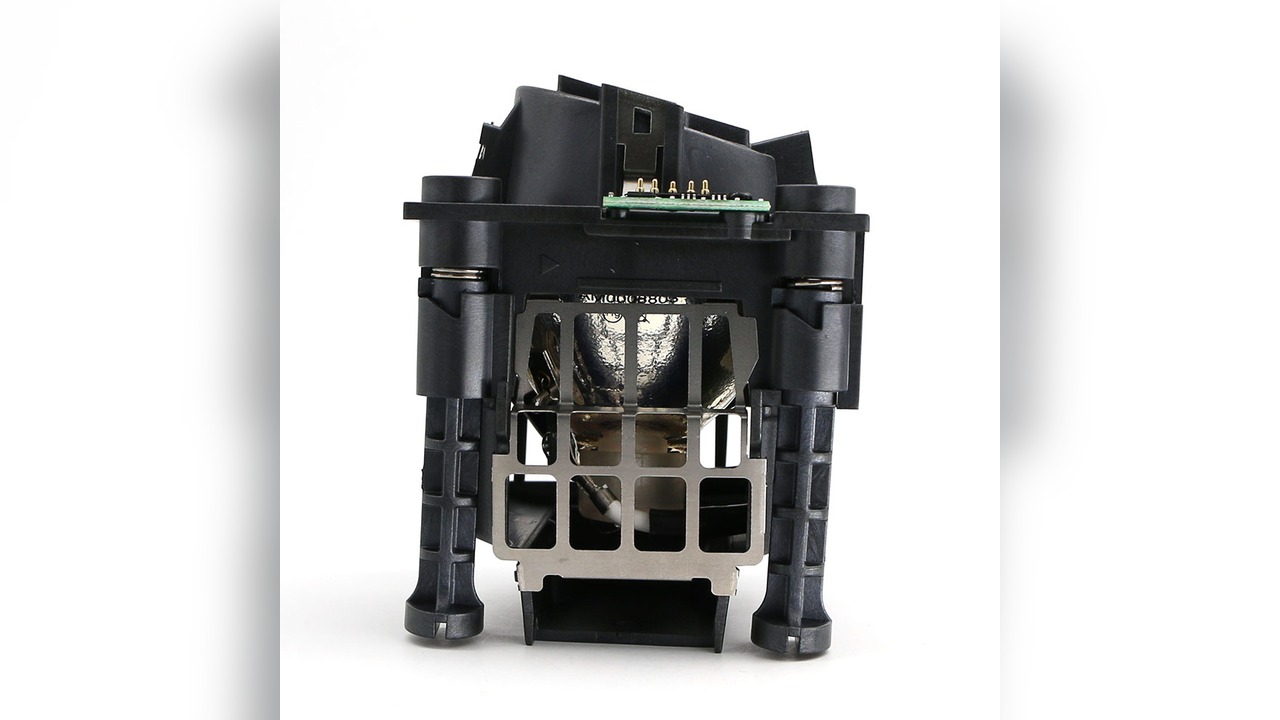
When replacing a Digital Projection projector lamp, the most time-consuming part is often not the installation itself, but confirming the model compatibility. The 104-089 covers 4 Digital Projection models. This article clearly lists the specifications, compatible models, and key points to verify.
Specifications Overview
| OEM Lamp Module Model | 104-089 |
| Zorsika Equivalent Model | 104-089 |
| Compatible Brand | Digital Projection |
| Lamp Module Specification | UHP300/250W 1.3 E21.8 |
| Lamp Type | UHP |
| Rated Power | 300W (Standard Mode) / 250W (Eco Mode) |
| Arc Gap | 1.3mm |
| Socket/Base | E21.8 |
| Reflector Size | 56X56D |
| Number of Compatible Models | 4 |
The above specifications are from the Zorsika product database. For the complete technical datasheet, please contact our sales team.
Digital Projection 104-089 Compatible Projector Models (4 Total)
The following verified compatible Digital Projection projector models for the 104-089 are listed, separated by commas:
dVision SX+, dVision HD, dVision XG, dVision 1080p
Three Things to Check Before Ordering
- Verify the Nameplate Model: Open the projector's lamp door. The model on the lamp module label should exactly match 104-089. Some Digital Projection models may have suffixes like -V or +, but the lamp modules are usually interchangeable. If unsure, take a photo of the nameplate and send it to Zorsika technical support for confirmation.
- Confirm the Lamp Type: The same model number is available in four forms: Original Packaged, Original Bare, Replacement, and Used. These forms differ significantly. The Original Bare type consists of an OEM arc tube with a third-party housing and typically offers the best overall value. Be sure to specify the desired type clearly on your order to avoid disputes upon delivery.
- Verify Physical Specifications: The reflector size (56X56D), socket/base (E21.8), and arc gap must match the original lamp. If any of these parameters do not match, the lamp may not fit or may fail to ignite.
What the Zorsika PRO Series Offers You
The Zorsika PRO Series provides replacement lamp modules for the 104-089 with specifications identical to the original. Key parameters are matched point-by-point against the OEM, supporting project supply and bulk procurement with more controllable lead times.
- Specification Matching: Power, arc gap, and reflector size are matched point-by-point according to OEM parameters.
- Individual Testing: Each lamp is individually ignited and tested before shipment, ensuring brightness and stability.
- Warranty Commitment: Lamps come with a 180-day warranty, covering non-artificial damage under normal use through after-sales service.
- Stable Supply: Supports bulk procurement and project-based supply.
In summary: if you want OEM quality but also seek a more hassle-free overall experience, the Zorsika PRO Series projector lamp is designed exactly for this scenario.
Note: Performance aspects like brightness and lifespan are significantly influenced by projector condition, operating environment, and cooling. Zorsika does not provide unified numerical guarantees. We recommend testing 1-2 sample units before bulk procurement.
Routine Maintenance to Extend Lamp Life
- Clean Dust Regularly: Dust accumulation on the air intake and air filter directly raises the lamp's operating temperature. In dusty environments, clean every 1-2 months; in normal office environments, every 3-6 months.
- Utilize Eco Mode: This lamp supports dual power modes (300W / 250W). Switching to eco mode for everyday presentations can significantly reduce the thermal load on the lamp.
- Avoid Frequent On/Off Cycles: Thermal cycling is a major cause of lamp wear. If the projector won't be used for a short period, use the shutter/blank function instead of repeatedly powering off.
- Proper Shutdown Procedure: Always wait for the cooling fan to stop completely before disconnecting power after shutdown. Powering off while the lamp is hot causes rapid cooling, a common cause of lamp rupture.
- Reset Lamp Hours After Replacement: After installing a new lamp, be sure to reset the lamp hour counter in the menu; otherwise, the projector will continue to trigger alarms based on the old timer.
Frequently Asked Questions
Q: My projector isn't in the list of 4 models above. Can I still use the 104-089?
A: The list represents verified models but is not exhaustive. Digital Projection projectors from the same generation often share lamp modules. Send photos of the projector's nameplate and the original lamp label to Zorsika technical support, and we can help confirm compatibility.
Q: How do I choose between Original Packaged, Original Bare, and Replacement lamps?
A: If you prioritize brightness stability and long-term reliability, the Zorsika PRO Series lamp is the top choice – it matches OEM parameters point-by-point, undergoes individual ignition testing before shipment, offers performance comparable to OEM with greater overall convenience, and includes a 180-day warranty. For standard commercial, educational, and conference room use, the PRO Series is also the more hassle-free option. While other replacement lamps have a lower upfront cost, the quality of the arc tube source and manufacturing control varies significantly, leading to a higher risk of brightness degradation and shortened lifespan. They are only recommended for temporary backup units.
Q: Why choose Zorsika PRO instead of the original OEM lamp?
A: The core philosophy of the Zorsika PRO Series is "OEM parameters, self-controlled quality": power, arc gap, and reflector size are matched point-by-point to the OEM, but with an additional individual ignition test before shipment and a 180-day warranty. Compared to OEM, it offers greater overall convenience; compared to other alternatives, it provides more consistent quality control.
Q: What should I do if the projector reports "Lamp Not Recognized" after replacement?
A: First, confirm whether the lamp hour counter has been reset, as most of these messages are caused by an uncleared timer. If the error persists after resetting, contact Zorsika technical support. We provide reset methods and troubleshooting guidance for the corresponding models.
Q: Is there an installation tutorial for the 104-089?
A: Yes. The lamp door location and disassembly/assembly steps are largely similar across these Digital Projection models. Contact Zorsika sales to obtain illustrated or video tutorials for your specific model.
Related Resources
- Zorsika Technical Support Center
- Projector Brand and Compatible Model Lookup
- Projector Lamp / Lens / Air Filter Product Library
Sales Inquiries
For consultation on Digital Projection 104-089 solutions, bulk pricing, or the complete compatibility list, please contact us via:
- Website: www.zorsika.com
- Phone: 0086-20-38551187
- Email: sales@zorsika.com
- Business Hours: Monday to Friday, 9:00-18:00
The lamp module models, specifications, and compatibility data in this article are sourced from the Zorsika product database. Data is continuously updated; please confirm with actual quotations.