
At a glance
- Specifications
- RS-IL01ST Standard Zoom Compatible Projector Models (21 models, with brightness/resolution)
- About This Original Lens
- Genuine Product and Purchasing Information
- FAQ
- Q: How do I choose between an original lens and a replacement lens?
- Q: How do I confirm this lens works with my projector?
- Q: How do I select the throw ratio?
- Q: How can I ensure the RS-IL01ST Standard Zoom is genuine?
- Q: What should I pay attention to when replacing the lens?
- Q: What is the warranty period for the lens?
- Related Inquiry Links
- Purchasing Consultation
Canon original lens RS-IL01ST Standard Zoom, Long Throw, throw ratio 1.50-2.25:1, compatible with 21 Canon projectors including REALiS SX6000, SX6000 D, WUX4000, WUX4000 D. Genuine supply, bulk orders available.
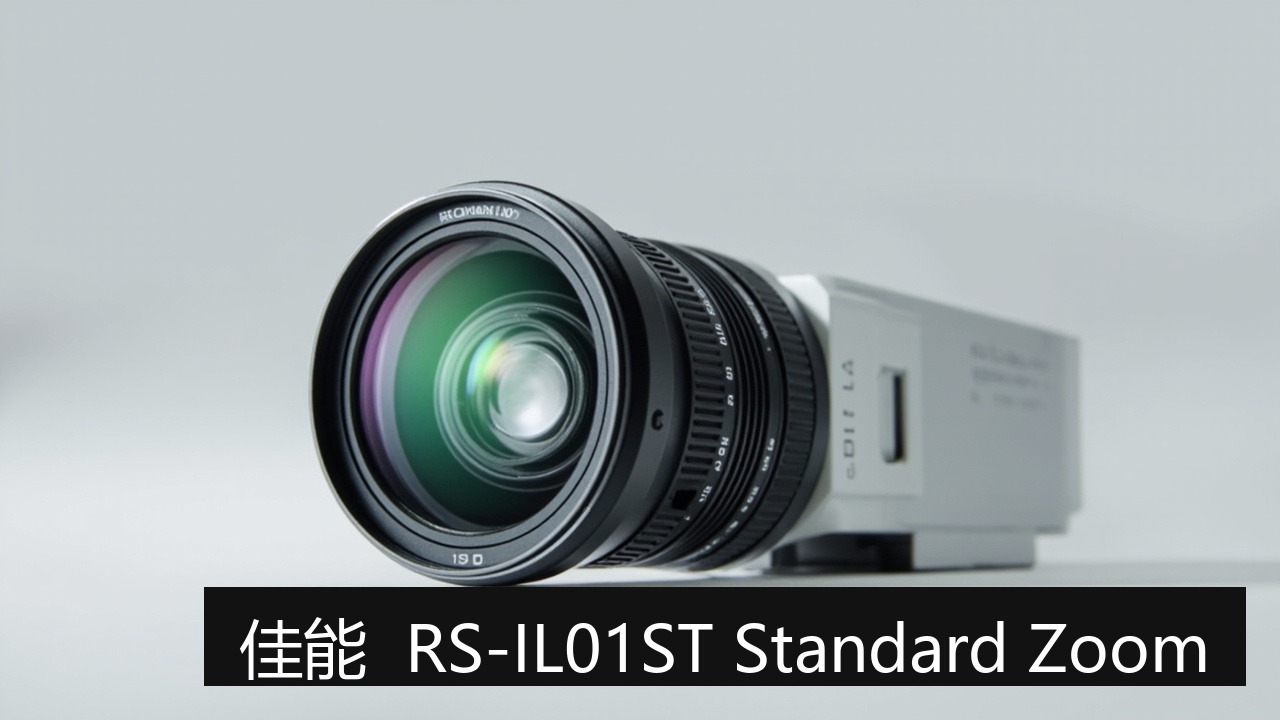
The Canon RS-IL01ST Standard Zoom is an original (OEM) lens for Canon installation projectors. It is a long throw lens with a throw ratio of 1.50-2.25:1. This article compiles its 21 compatible projector models, optical specifications, and purchasing considerations for quick compatibility verification by projector model.
Specifications
| Lens Model | RS-IL01ST Standard Zoom |
| Brand (OEM) | Canon (Canon) |
| Throw Ratio | 1.50-2.25:1 |
| Product Type | Long Throw |
| Number of Compatible Models | 21 models |
| OEM Product Page | Canon Official Introduction |
The above specifications are sourced from OEM documentation and the Zorsika product database; full technical datasheets are available upon request from sales.
RS-IL01ST Standard Zoom Compatible Projector Models (21 models, with brightness/resolution)
The following are verified compatible projector models for the RS-IL01ST Standard Zoom, each with brightness and resolution; the applicable lens model for all is RS-IL01ST Standard Zoom:
| Projector Model | Brightness | Resolution | Lens Model |
|---|---|---|---|
| Canon REALiS SX6000 | — | — | RS-IL01ST Standard Zoom |
| Canon REALiS SX6000 D | — | — | RS-IL01ST Standard Zoom |
| Canon REALiS WUX4000 | — | — | RS-IL01ST Standard Zoom |
| Canon REALiS WUX4000 D | — | — | RS-IL01ST Standard Zoom |
| Canon REALiS WUX5000 | — | — | RS-IL01ST Standard Zoom |
| Canon REALiS WUX5000 D | — | — | RS-IL01ST Standard Zoom |
| Canon REALiS WUX6000 | — | — | RS-IL01ST Standard Zoom |
| Canon REALiS WUX6000 D | — | — | RS-IL01ST Standard Zoom |
| Canon REALiS WUX6010 | — | — | RS-IL01ST Standard Zoom |
| Canon REALiS WUX6010 D | — | — | RS-IL01ST Standard Zoom |
| Canon REALiS WUX6500 | — | — | RS-IL01ST Standard Zoom |
| Canon REALiS WUX6500 D | — | — | RS-IL01ST Standard Zoom |
| Canon REALiS WX6000 | — | — | RS-IL01ST Standard Zoom |
| Canon REALiS WX6000 D | — | — | RS-IL01ST Standard Zoom |
| Canon Europe XEED SX6000 | — | — | RS-IL01ST Standard Zoom |
| Canon Europe XEED WUX4000 | — | — | RS-IL01ST Standard Zoom |
| Canon Europe XEED WUX5000 | — | — | RS-IL01ST Standard Zoom |
| Canon Europe XEED WUX6000 | — | — | RS-IL01ST Standard Zoom |
| Canon Europe XEED WUX6010 | — | — | RS-IL01ST Standard Zoom |
| Canon Europe XEED WUX6500 | — | — | RS-IL01ST Standard Zoom |
| Canon Europe XEED WX6000 | — | — | RS-IL01ST Standard Zoom |
Note: Brightness/resolution are taken from the model database (refer to the nameplate/user manual on the unit); lens compatibility is determined by the lens mount and panel/chip size on the projector. For models not listed, contact Zorsika technical support for confirmation.
About This Original Lens
Canon RS-IL01ST Standard Zoom Lens
The RS-IL01ST Standard Zoom is a long throw lens manufactured by Canon as an OEM product. Its optical structure, lens coatings, and body tolerances are matched to original machine standards, ensuring plug-and-play installation and stable imaging. For installation environments with restricted throw distances (e.g., short-distance large-screen projection, wall-mounted ultra-short throw), selecting the correct throw ratio is more critical than choosing a universal lens.
This lens has a throw ratio of 1.50-2.25:1. Throw ratio = projection distance ÷ image width: the smaller the value, the larger the image (suitable for short distances in small spaces); the larger the value, the greater the required installation distance. Calculate the required throw ratio range based on the on-site installation distance and screen size, then match it to this model.
Genuine Product and Purchasing Information
Zorsika supplies genuine Canon original lenses, the RS-IL01ST Standard Zoom, through authorized channels, complete with original packaging and traceable serial numbers. Suitable for bulk procurement and project supply in installation projection, conference rooms, classrooms, and other applications.
- Genuine Product Guarantee: Sourced through official authorized channels, with original packaging and serial numbers. For bulk projects, channel documentation can be requested to eliminate refurbished units or unverified sources.
- Compatibility Verification: Provide the projector model before ordering, and Zorsika technical support will confirm against the compatible model list above to avoid installation issues.
- Project Supply: The RS-IL01ST Standard Zoom covers 21 models; common projects can be scheduled in advance to shorten lead times.
- Alternative Solutions: For budget-sensitive projects, Zorsika also offers equivalent replacement lenses with key specifications benchmarked against the original, available as needed.
Note: Actual imaging performance is affected by projector condition and installation environment; it is recommended to test one unit before large-volume orders.
FAQ
Q: How do I choose between an original lens and a replacement lens?
A: Original lenses are manufactured by Canon, with optical parameters and body tolerances calibrated to the original machine, suitable for projects with strict requirements for OEM consistency. Zorsika replacement lenses are independently designed and manufactured to the same specifications, with throw ratio, image circle, and mount matched to the original machine, offering advantages in budget and lead time. Zorsika supplies both options—choose based on project requirements.
Q: How do I confirm this lens works with my projector?
A: Compatibility is determined by the lens mount and panel/chip size on the projector; this article lists verified compatible models. Projectors of the same generation and brand often share the same mount. If unsure, photograph the nameplate on the unit and send it to Zorsika technical support for confirmation—this is the safest approach.
Q: How do I select the throw ratio?
A: Throw ratio = projection distance ÷ image width. The smaller the value, the larger the image (short throw/ultra-short throw suits short distances in small spaces); the larger the value, the greater the required installation distance. Calculate the required throw ratio range based on installation distance and screen size, then match it to this model's focal length range.
Q: How can I ensure the RS-IL01ST Standard Zoom is genuine?
A: Zorsika supplies genuine products through authorized channels, with original packaging and traceable serial numbers; for bulk projects, channel documentation can be requested to ensure the lens is not refurbished or a used disassembled unit.
Q: What should I pay attention to when replacing the lens?
A: Before removal and installation, ensure the projector is powered off and the cooling fan has stopped; hold the lens by the barrel without touching the glass, and use a blower for dust. After installation, test focus before tightening the locking screws, and clean the mount and contacts as you go.
Q: What is the warranty period for the lens?
A: Zorsika provides a 12-month warranty on all projector lenses; for normal use and non-manual damage (e.g., impacts, water ingress, unauthorized disassembly), contact after-sales service directly. The warranty period is based on the shipping document date.
Related Inquiry Links
- Zorsika Technical Support Center
- Projector Brand and Compatible Model Lookup
- Projector Lamp / Lens / Air Filter Product Library
Purchasing Consultation
For consultation on the Canon original lens RS-IL01ST Standard Zoom, project solutions, or the complete compatible model list, contact us through the following channels:
- Website: www.zorsika.com
- Phone: 0086-20-38551187
- Email: sales@zorsika.com
- Business Hours: Monday to Friday, 9:00-18:00
The lens model and compatible projector data in this article are sourced from OEM documentation and the Zorsika product database. Data is continuously updated; final confirmation is subject to actual inquiry.